Use this function to print a detail listing of vendor transactions, reporting the balance of each transaction in the appropriate ageing column.
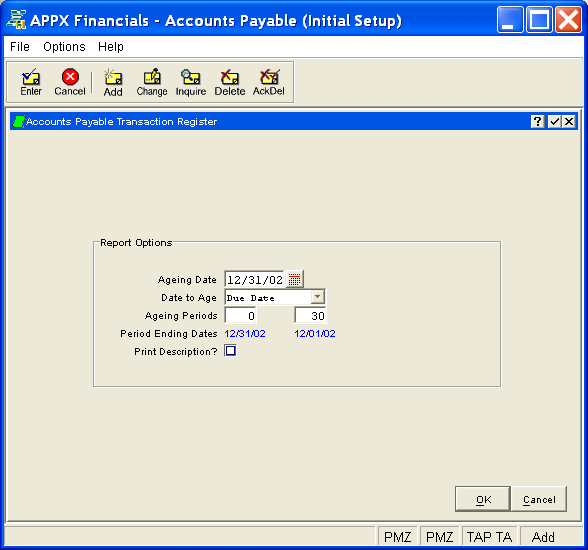
The Transaction Register Report Setup Screen, shown in Figure 5-6 below, appears when you select Transaction Register from the Reports Pulldown Menu. This screen allows you to establish report options to be stored in a temporary one-record file. You enter the setup screen in Add mode and you are not allowed to change mode.
Figure 5-6. Transaction Register Report Setup Screen
This screen contains the following report options for printing the Transaction Register Report:
Enter the date from which the transactions printed will be aged. By default, the system displays today's date. You can enter a new date to override the display.
Enter the preferred basis for ageing transactions. The system initially
defaults the ageing type specified on the Parameters
(Reporting) Screen. Click the list  button to select
one of the options listed below:
button to select
one of the options listed below:
|
Invoice Date: |
Age transactions based on Invoice Date |
|
Due Date: |
Age transactions based on Due Date |
Enter a series of two number of days in ascending order (with up to 3 digits each plus a "-" if needed for a negative entry). These entries are used to define three periods for ageing each transaction based on invoice date or due date, depending on the Date to Age field above, from the ageing date. A negative entry indicates the number of days future to the ageing date while a positive entry indicates the number of days prior to the ageing date. The system initially defaults the entries specified for the Transaction Register on the Parameters (Reporting) Screen but they can be changed.
For example, entries of 0 and 30 would define periods of 0 and under, 1 to 30, and 31 and over.
The system displays the actual period ending dates which correspond to the ageing periods entered. Each date is determined by subtracting the number of days in the corresponding ageing period from the ageing date.
Select "yes" or  if you want to include the
transaction description on the report; otherwise, select "no"
or
if you want to include the
transaction description on the report; otherwise, select "no"
or  . The initial default is "no". Printing this
information requires an extra line.
. The initial default is "no". Printing this
information requires an extra line.
Press ENTER or click  or the OK
button to store the report options and continue. The system may redisplay
the screen to report any error or warning messages. If so, you must address
any concerns and press ENTER or click or the OK
button again. To exit the function, press END or click
or the OK
button to store the report options and continue. The system may redisplay
the screen to report any error or warning messages. If so, you must address
any concerns and press ENTER or click or the OK
button again. To exit the function, press END or click  or
the Cancel
button.
or
the Cancel
button.
If you elect to continue, you will follow the same general procedure for printing that is used in all APPX applications. Refer to the APPX User Manual for detailed instructions in regard to any record selection, sort order, and/or disposition screens that appear.
A sample Transaction Register Report is shown below.
|
Expert Computing, Inc. 09/08/94 16:28 LGG Page: 1 Transaction Register Report Aged as of 08/15/89 Using Due Date 08/15/89 07/16/89 Apply To Typ ID Ctrl Trx Inv/Chck PO No Trx Date Due Date Amount Balance 0 & Under 1 To 30 Over 30 Description Pay Status ==================================================================================================================================== Account 1061001000 Prepaids & Deposits Vendor 00000010 Miscellaneous Supplier ( ) - Misc Vendor Westin Hotel DEP6/89 PRE SRR 1 0003 702 DEP6/89 06/20/89 06/20/89 1200.00- deposit on convention room Normal DEP6/89 INV SRR 3 0004 11255 DEP6/89 07/14/89 07/31/89 1200.00 .00 0. .00 0. convention room Normal —————— —————— —————— —————— Credit Limit 50000 — Vendor Totals —> .00 0. .00 0. Available 50000 .0 % .0 % .0 % ==================================================================================================================================== Vendor 00000020 Pool and Associates (206) 555-4778 9877DEP PRE SRR 7 0002 306 9877DEP 08/10/89 08/10/89 1500.00- 1500.00- 0. 1500.00- 0. deposit on mailer production Normal —————— —————— —————— —————— Credit Limit 100000 — Vendor Totals —> 1500.00- 0. 1500.00- 0. Available 101500 .0 % 100.0 % .0 % ==================================================================================================================================== —————— —————— —————— —————— — Account Totals —> 1500.00- 0. 1500.00- 0. .0 % 100.0 % .0 % ============ ============ ============ ============ Account 2010001001 Accounts Payable, Sales Vendor 00000040 Albert Materials, Inc. (206) 555-1256 1006 INV SRR 7 0011 1006 08/06/89 08/25/89 2597.00 1006 PMT SRR 8 0001 5500 08/16/89 08/16/89 2597.00- .00 .00 0. 0. 308 INV SRR 4 0010 308 07/26/89 08/25/89 4128.15 308 PMT SRR 8 0001 5500 08/16/89 08/16/89 4128.15- .00 .00 0. 0. 311 INV SRR 4 0011 311 07/18/89 08/10/89 2491.70 311 PMT SRR 8 0001 5500 08/16/89 08/16/89 2491.70- .00 0. .00 0. 34576 ADJ SRR 1 0002 34576 08/15/89 08/15/89 36.00- 36.00- 0. 36.00- 0. 84700 ADJ SRR 1 0003 84700 08/15/89 08/15/89 88.00- 88.00- 0. 88.00- 0. 96215 INV SRR 8 0007 96215 08/14/89 09/10/89 2058.00 96215 PMT SRR 8 0001 5500 08/16/89 08/16/89 2058.00- .00 .00 0. 0. —————— —————— —————— —————— Credit Limit 1000000 — Vendor Totals —> 124.00- .00 124.00- 0. Available 1000124 .0 % 100.0 % .0 % |