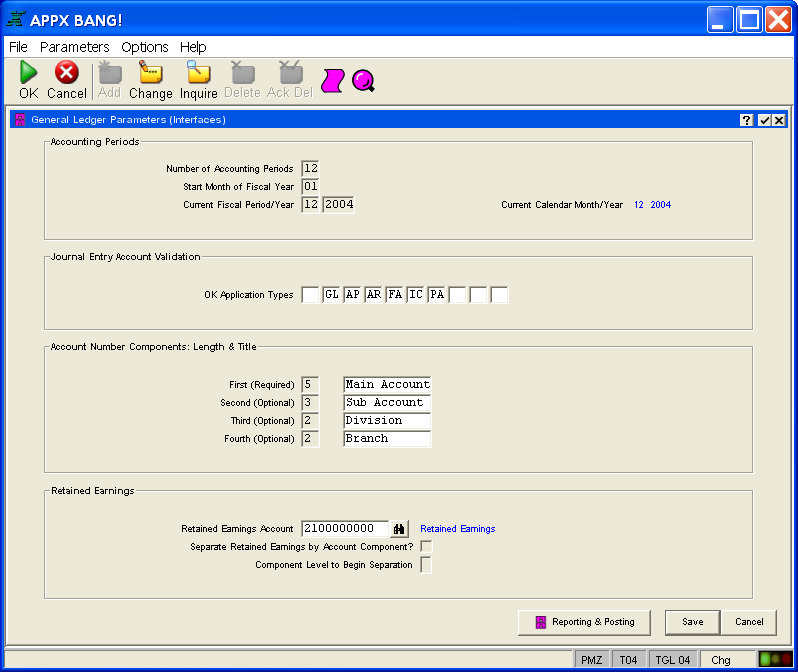
Although there are virtually no limitations on the type and format of information you may see on an APPX terminal screen, there are some patterns that are common throughout all applications.
Title Bars are located at the top of every APPX screen and screen overlay. They generally describe the function or contents of the screen and also provide three special functions in the form of buttons that are located at the far right end of the title bar. These buttons vary depending on the level of the title bar.
Directly under the main APPX title bar is the Menu Bar. It contains special functions in categories such as File, Options, Help, Application, and Processes. Under the menu bar is the Tool Bar which contains several icons These icons represent functions that can be performed throughout APPX applications.
The body of the screen contains text or items, or a mixture of both, depending on the type of process. For example, a menu contains a list of one or more options, usually in the form of buttons. An input process contains one or more items to enter.
The bottom of every screen contains a Status Bar, a common area that APPX uses to provide relevant information at all times while running your application.
Figure 3 below shows a sample APPX screen layout, in this case, for a simple input process.
Figure 3. Sample APPX Screen Layout